DIST — Design, Installation, Support, Technology
Home
Services
Audiovisual & CollaborationConference Room AVVideo SystemsAudio SystemsControl & Automation
Managed IT & CloudManaged IT ServicesMicrosoft 365Cloud Solutions
Physical SecurityCCTV & SurveillanceAccess Control
Infrastructure & DeploymentLow-Voltage CablingNationwide Truck Rollouts
Projects
Locations
New York CityMiami
Resources
BlogInsights & industry updatesPress & MediaNews coverage & features
AboutContact
(212) 206-0794
DIST

Design, Installation, Support and Technology — integrated AV, IT and security solutions for businesses.

Audiovisual

  • Conference Room AV
  • Video Systems
  • Audio Systems
  • Control & Automation

IT & Security

  • Managed IT Services
  • Microsoft 365
  • Cloud Solutions
  • CCTV & Surveillance
  • Access Control

Company

  • About
  • Projects
  • Contact
  • Client information
  • Vendor information

Contact

  • (212) 206-0794
  • [email protected]
  • Mon–Fri 8:00 AM – 5:00 PM
  • 24/7 Help Desk Support
Ask AI about DISTGet an independent summary of who we are and what we do.
  • ChatGPT
  • Claude
  • Perplexity
  • Google AI
  • Grok
© 2026 DIST. All rights reserved.
  • Privacy Policy
  • Sitemap
Start a projectCall (212) 206-0794Email [email protected]
DIST — Design, Installation, Support, Technology
Home
Services
Audiovisual & CollaborationConference Room AVVideo SystemsAudio SystemsControl & Automation
Managed IT & CloudManaged IT ServicesMicrosoft 365Cloud Solutions
Physical SecurityCCTV & SurveillanceAccess Control
Infrastructure & DeploymentLow-Voltage CablingNationwide Truck Rollouts
Projects
Locations
New York CityMiami
Resources
BlogInsights & industry updatesPress & MediaNews coverage & features
AboutContact
(212) 206-0794
DIST

Design, Installation, Support and Technology — integrated AV, IT and security solutions for businesses.

Audiovisual

  • Conference Room AV
  • Video Systems
  • Audio Systems
  • Control & Automation

IT & Security

  • Managed IT Services
  • Microsoft 365
  • Cloud Solutions
  • CCTV & Surveillance
  • Access Control

Company

  • About
  • Projects
  • Contact
  • Client information
  • Vendor information

Contact

  • (212) 206-0794
  • [email protected]
  • Mon–Fri 8:00 AM – 5:00 PM
  • 24/7 Help Desk Support
Ask AI about DISTGet an independent summary of who we are and what we do.
  • ChatGPT
  • Claude
  • Perplexity
  • Google AI
  • Grok
© 2026 DIST. All rights reserved.
  • Privacy Policy
  • Sitemap
Start a projectCall (212) 206-0794Email [email protected]
Skip to content
DIST — Design, Installation, Support, Technology
Home
Services
Audiovisual & CollaborationConference Room AVVideo SystemsAudio SystemsControl & Automation
Managed IT & CloudManaged IT ServicesMicrosoft 365Cloud Solutions
Physical SecurityCCTV & SurveillanceAccess Control
Infrastructure & DeploymentLow-Voltage CablingNationwide Truck Rollouts
Projects
Locations
New York CityMiami
Resources
BlogInsights & industry updatesPress & MediaNews coverage & features
AboutContact
(212) 206-0794
Home/Blog/IT SOLUTIONS
IT SOLUTIONS

The Essential Guide to Office Wi-Fi Optimization for Reliable Meetings.

Bryant VasquezBryant VasquezChief Technology Officer at DISTPublished Nov 29, 2025

Table of contents

  • Why Office WiFi Is Different from Home WiFi?
  • What Affects WiFi Quality?
  • How Optimization Solves Meeting Issues?

Table of contents

  • Why Office WiFi Is Different from Home WiFi?
  • What Affects WiFi Quality?
  • How Optimization Solves Meeting Issues?

Even the most advanced audio and video systems fail when WiFi cannot support multiple connected devices. Office WiFi optimization is critical for reliable meetings, cloud applications, and uninterrupted collaboration.

Why Office WiFi Is Different from Home WiFi?

Home routers are not built to carry dozens of devices. Offices need access points, proper placement, bandwidth management, and interference control. Optimizing your office WiFi is key to keeping video and audio perfectly in sync, complementing tips we shared in understanding AV latency and keeping audio and video in sync.

What Affects WiFi Quality?

Poor wireless performance often comes from structural and configuration issues such as thick walls, glass partitions, improper access point placement, channel interference, and unmanaged guest traffic. These issues directly impact conference room reliability.

How Optimization Solves Meeting Issues?

  • Professional mapping ensures coverage in every room, helping your DSP setups run smoothly as explained in expert DSP configuration for seamless audio.
  • Business access points reduce congestion.
  • Smart tuning removes interference.
  • Conference rooms get priority traffic for meetings, ensuring uninterrupted calls on any platform, including Zoom, Teams, or Webex.

Support305 provides professional office WiFi optimization for South Florida businesses, ensuring reliable meetings and fast connectivity. Contact us today to schedule a site assessment.
Explore More Blogs

Discover more insights and tips from our latest articles

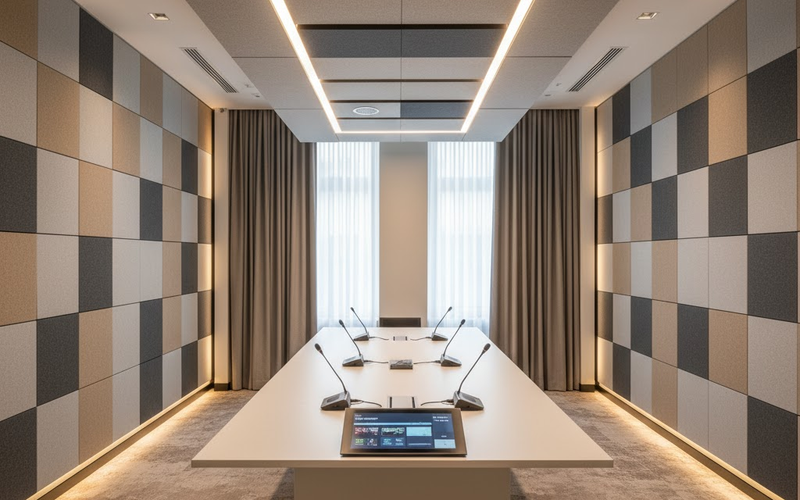
A modern conference room with acoustic wall panels, ceiling clouds, carpeted floor, and a central conference table with microphones and displays, warm lighting, neutral tones, minimal design, focus on acoustic comfort. AUDIO/VISUALNov 17, 2025

What Are Room Acoustics and How it Defines Conference Room Audio Quality

Even the best microphones can’t fix bad room acoustics. Here’s how acoustic treatment transforms your conference room into a clear, distraction-free communication space.

Jose SalaJose SalaAudio Engineer & Account Executive at DISTRead article
ImgIT SOLUTIONSDec 21, 2025

Why Every Office Needs a Professional Network Audit in 2025

A professional network audit uncovers performance issues, security risks, and outdated configurations before they disrupt your business operations.

Bryant VasquezBryant VasquezChief Technology Officer at DISTRead article
Boardroom at 3 Times Square with a certified video bar above the display and a long conference tableCONFERENCENov 3, 2026

AI-Ready Conference Room: What Your Meeting Room Needs for Copilot, Zoom AI and Gemini

An AI-ready conference room gives Copilot, Zoom AI Companion and Gemini what they need to work: full-room microphone coverage with DSP, a camera that can identify who is speaking, a certified room system, and the license tier that unlocks intelligent audio and video. Here is what to buy, and in what order.

Gerson CarrilloGerson CarrilloDirector Of Professional Services at DISTRead article
DIST

Design, Installation, Support and Technology — integrated AV, IT and security solutions for businesses.

Audiovisual

  • Conference Room AV
  • Video Systems
  • Audio Systems
  • Control & Automation

IT & Security

  • Managed IT Services
  • Microsoft 365
  • Cloud Solutions
  • CCTV & Surveillance
  • Access Control

Company

  • About
  • Projects
  • Contact
  • Client information
  • Vendor information

Contact

  • (212) 206-0794
  • [email protected]
  • Mon–Fri 8:00 AM – 5:00 PM
  • 24/7 Help Desk Support
Ask AI about DISTGet an independent summary of who we are and what we do.
  • ChatGPT
  • Claude
  • Perplexity
  • Google AI
  • Grok
© 2026 DIST. All rights reserved.
  • Privacy Policy
  • Sitemap
Start a projectCall (212) 206-0794Email [email protected]